The store
Search the way a shopper would. Type your own search, or try one of these:
Press Ask in the corner of the store to open the shopping assistant.
Open the storeA shopper types “red dress under $50”. Plainseek shows red dresses under $50, not every product with the word “under”. It forgives typos, knows your synonyms, and shows you what shoppers search for.
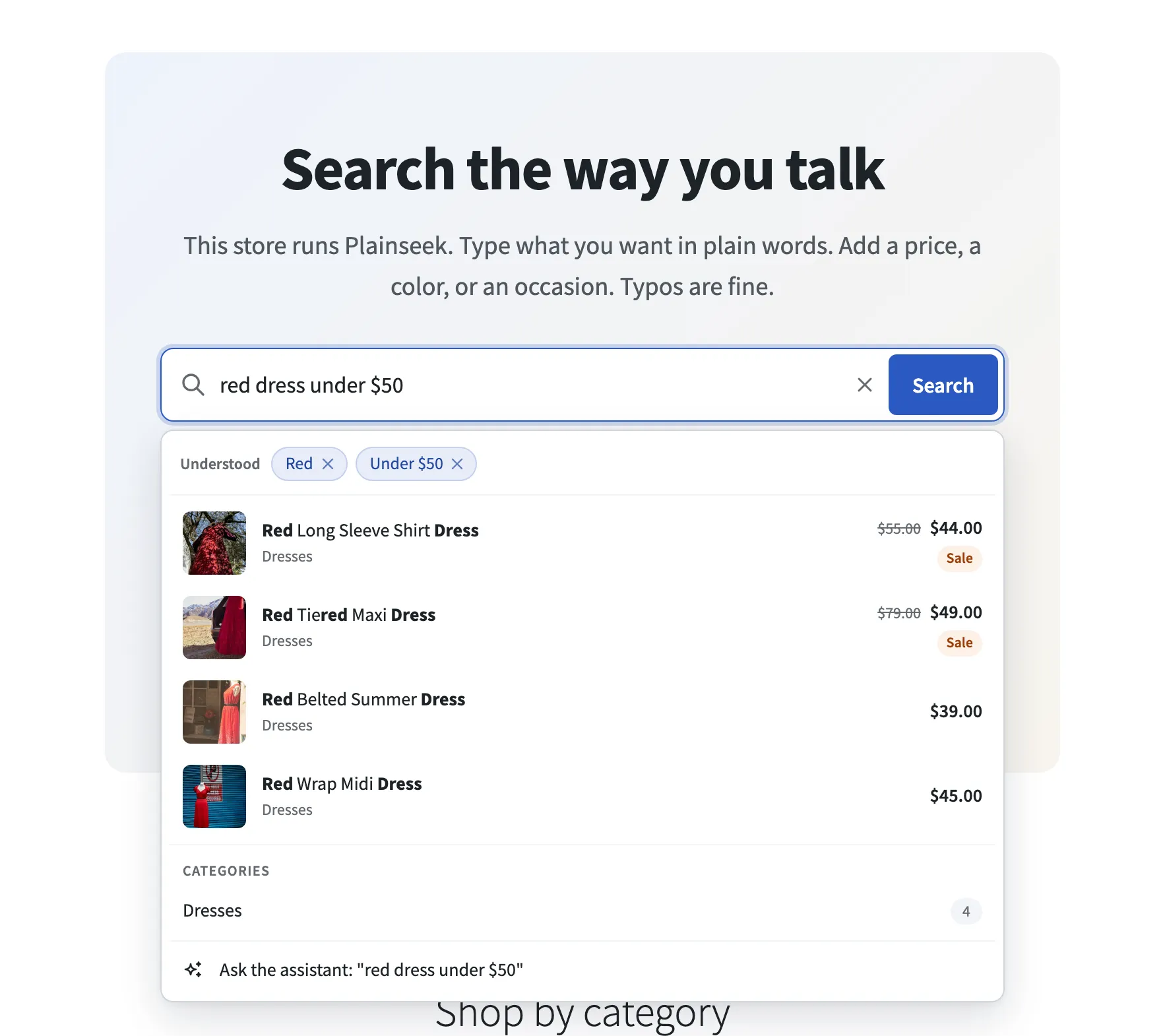
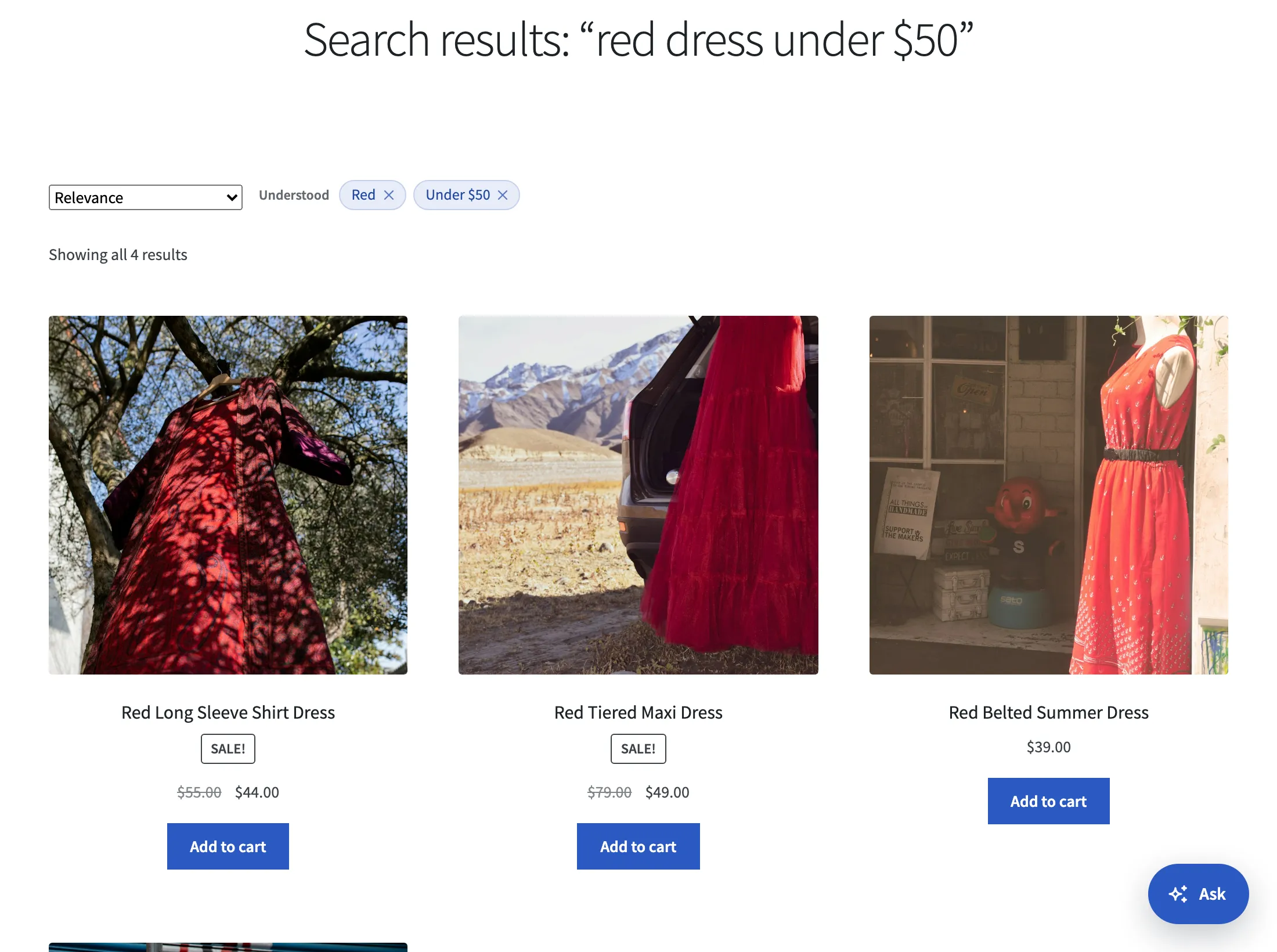
Plainseek reads the search before it runs it. Words that match your prices, colors, sizes, materials, and brands become filters. Shoppers see each filter as a chip they can remove. Pick a search below. The results are from the live demo.
red dress under $50
4 products found
Search it in the demo
Red Long Sleeve Shirt Dress
$55.00 $44.00

Red Tiered Maxi Dress
$79.00 $49.00

Red Belted Summer Dress
$39.00
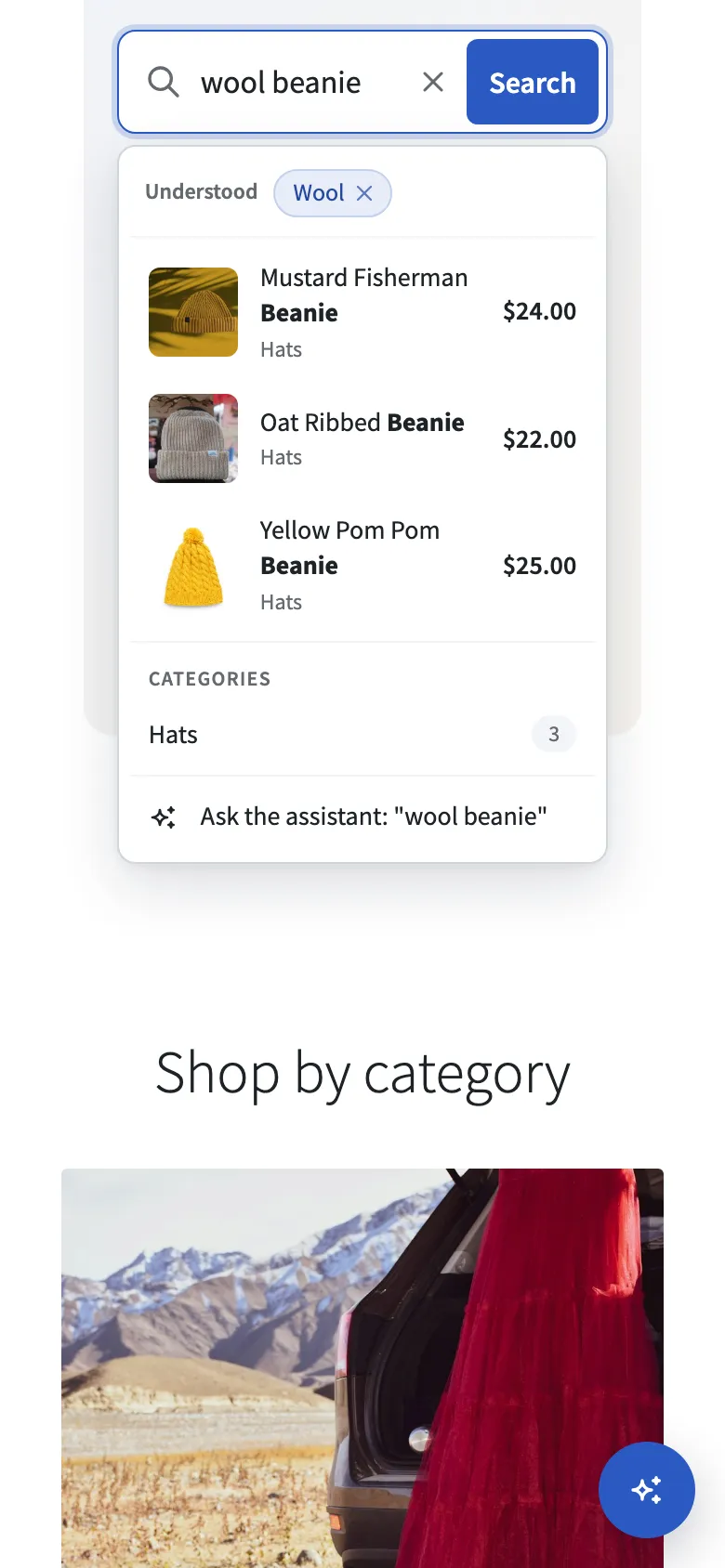
cheapest wool beanie
3 products found
Search it in the demo
Oat Ribbed Beanie
$22.00

Mustard Fisherman Beanie
$24.00

Yellow Pom Pom Beanie
$25.00
leather backpack between 50 and 150
2 products found
Search it in the demo
Black Flap Leather Backpack
$139.00

Tan Leather Satchel Backpack
$149.00
white sneakers in stock
3 products found
Search it in the demo
Minimal White Canvas Sneakers
$45.00

White Leather Low-Top Sneakers
$79.00

Suede Trim Court Sneakers
$85.00
weding dersses
6 products found
Search it in the demo
Lace Bodice Wedding Dress
$289.00

Tulle Garden Wedding Gown
$349.00

White Lace Maxi Dress
$119.00
couch
16 products found
Search it in the demo
Cognac Leather Sofa
$1,290.00

Gray Three Seater Sofa
$749.00

Burnt Orange Sofa
$899.00
Plainseek turns a word into a filter only when your store has that value. In a store with no red products, “red” is searched as a word.
The demo is a WooCommerce store with 220 products and the Storefront theme. Plainseek runs there as you download it. Search like a shopper, then open the admin to see what the store owner sees.
Search the way a shopper would. Type your own search, or try one of these:
Press Ask in the corner of the store to open the shopping assistant.
Open the storeSee the settings, the analytics, and the synonyms. You can try every setting, but changes are not saved. One click signs you in.
demodemoOr sign in yourself at plainseek-demo.jawad.work/wp-login.php
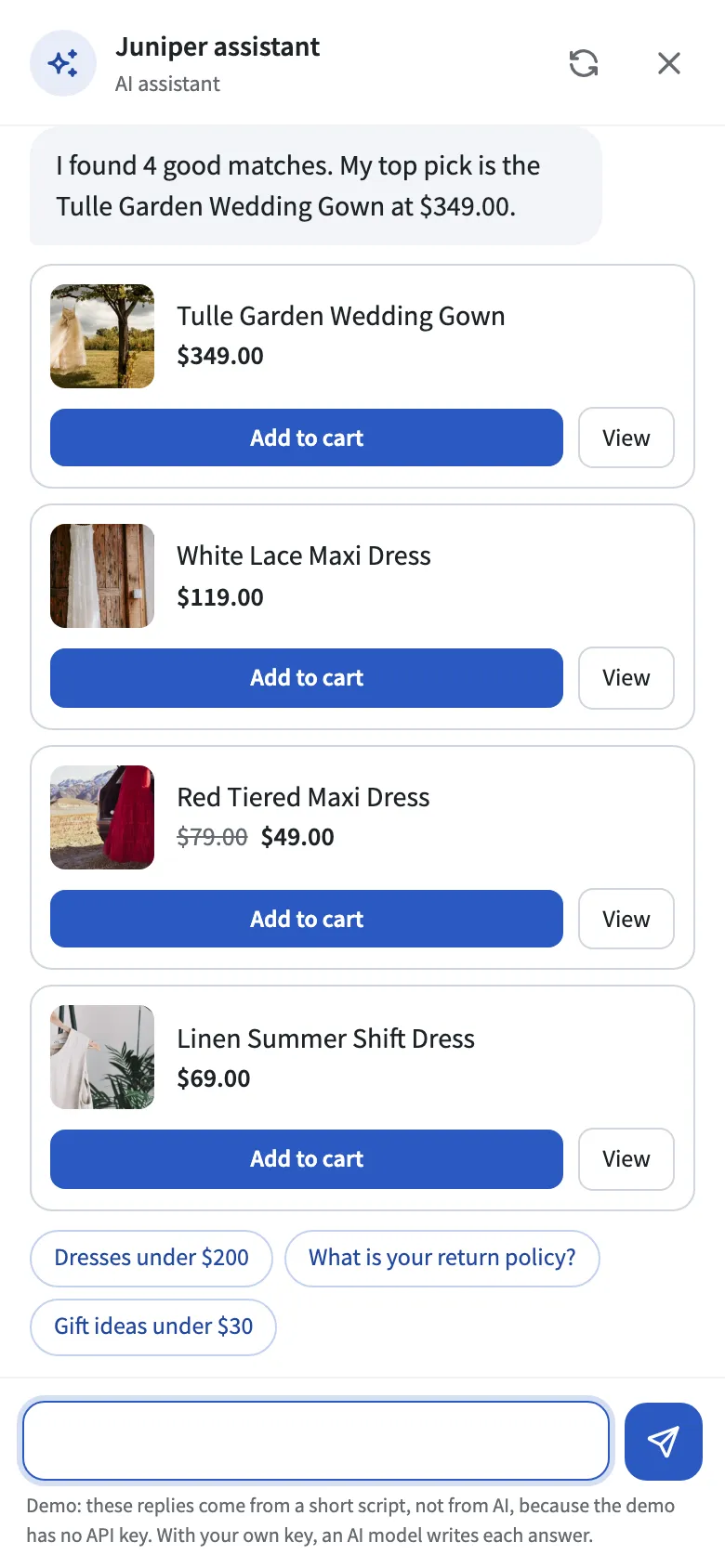
The AI in the demo is scripted. The demo has no API key, so the assistant's replies come from a short script. Plainseek's own work is real: it finds the products and reads the store pages. With your own key, an AI model writes each answer.
It resets every night at 04:00 UTC, so the demo is always clean.
Checkout is turned off. It is a demo store, and nothing is for sale.
Plainseek keeps its own search index in your WordPress database. The search runs on your server. It costs nothing to run, and it sends no data to anyone.
“under $50”, “between 20 and 60”, “around $100”, and “$30+” become price filters.
Colors, sizes, materials, brands, and any other attribute in your store. Only values your products use.
“cheapest”, “newest”, “best selling”, “top rated”, “in stock”, and “on sale”.
“weding dersses” finds wedding dresses. Longer words allow more typos.
“dresses” finds “dress”, and “dress” finds “dresses”. For stores in English.
Two-way, like “sofa, couch”, and one-way, like “tv” also finds “television”. Import and export them as CSV.
Photos, prices, sale badges, and categories. The dropdown works with the keyboard and with screen readers.
When a filter matches nothing, Plainseek says so and shows the closest products, not an empty page.
Choose how much the name, SKU, categories, attributes, and description count. Lift best sellers and push out-of-stock products down.
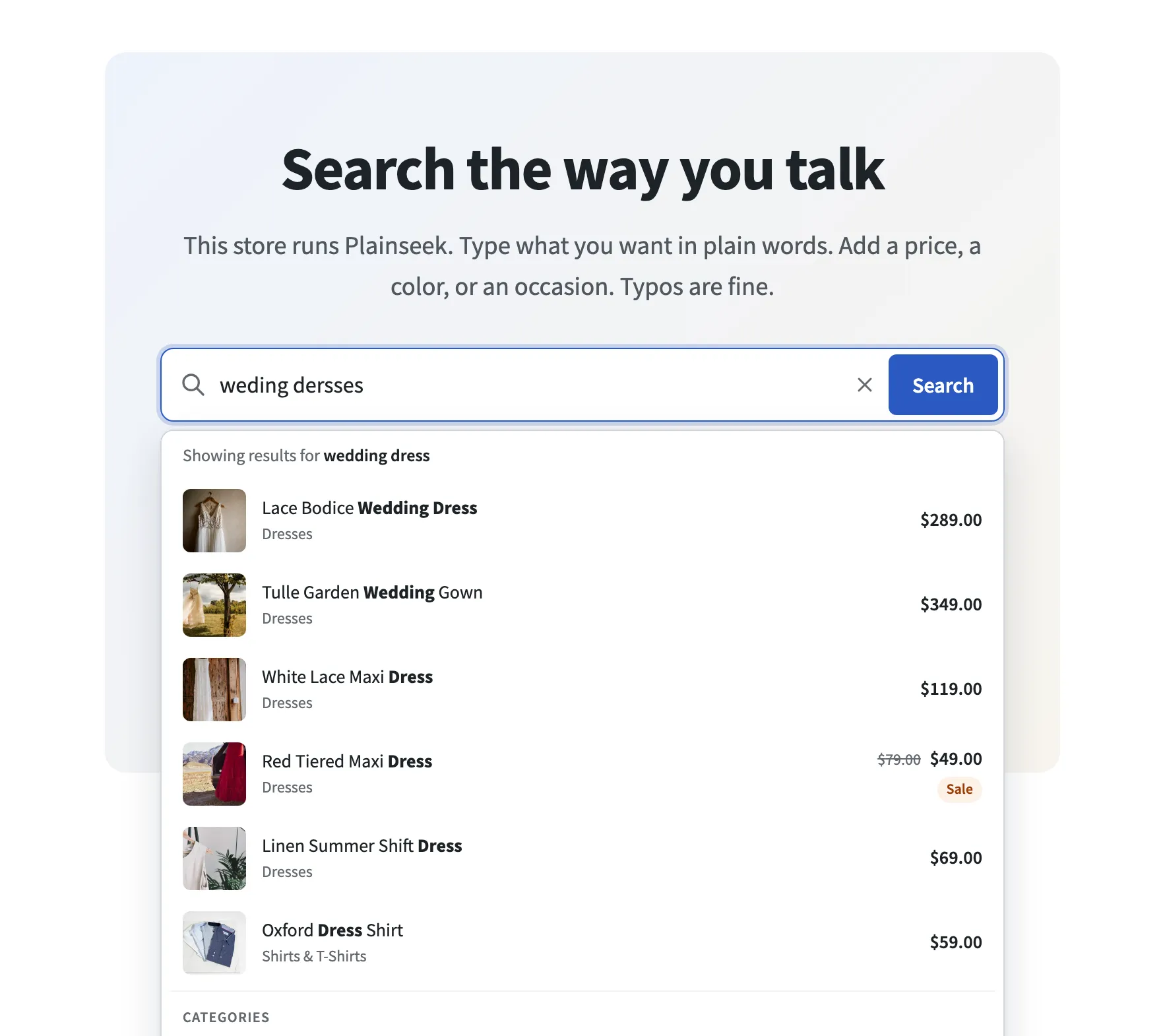
Plainseek compares an unknown word with the words in your catalog and picks the closest one. The panel says “Showing results for wedding dress”, so the shopper knows what happened.
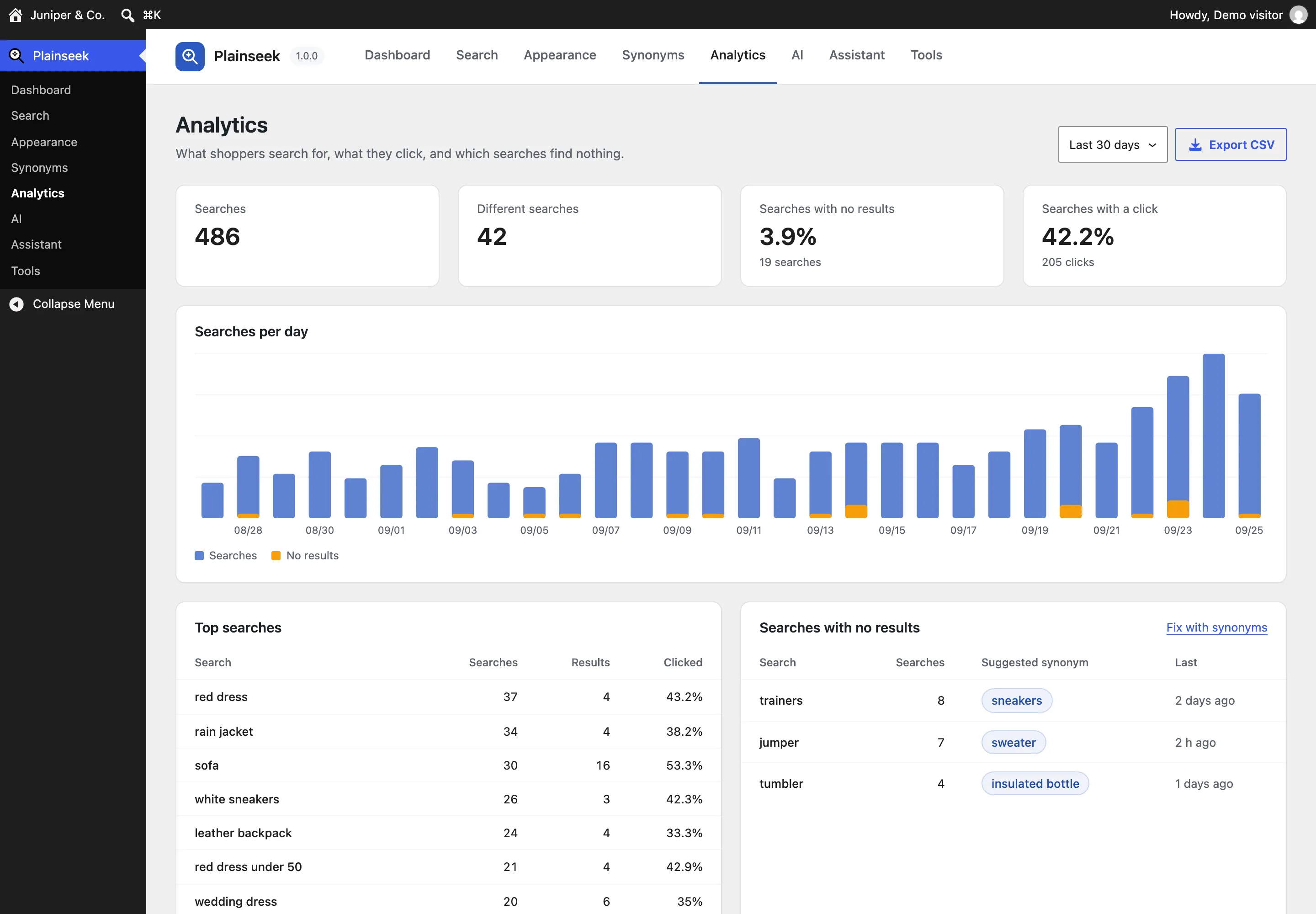
Every search is saved in your own database. You learn what shoppers want, and what your store is missing.
What shoppers search for most, how many products each search found, and how often shoppers clicked one.
Each one is a shopper who did not find anything. Now you can see them.
A shopper searches “trainers”, finds nothing, then searches “sneakers”. Plainseek suggests the synonym, and one click adds it.
No IP addresses and no user accounts are stored. Export any report as CSV.
AI features are off until you turn them on. You connect your own account with an AI provider and pay the provider directly. Plainseek does not include or resell any AI service.
“something for a beach wedding” finds sundresses and sandals. Plainseek blends meaning with the exact words, and you choose the balance.
A question like “I need a warm jacket for rainy walks” becomes a short product search. The results of the shopper’s own words are kept too.
Answers questions about products, shipping, returns, and payment, from store pages you pick. It shows real product cards with an Add to cart button.
Search by meaning and the chat model are two settings, so you can use one provider for each. With Ollama, the model runs on your own server.
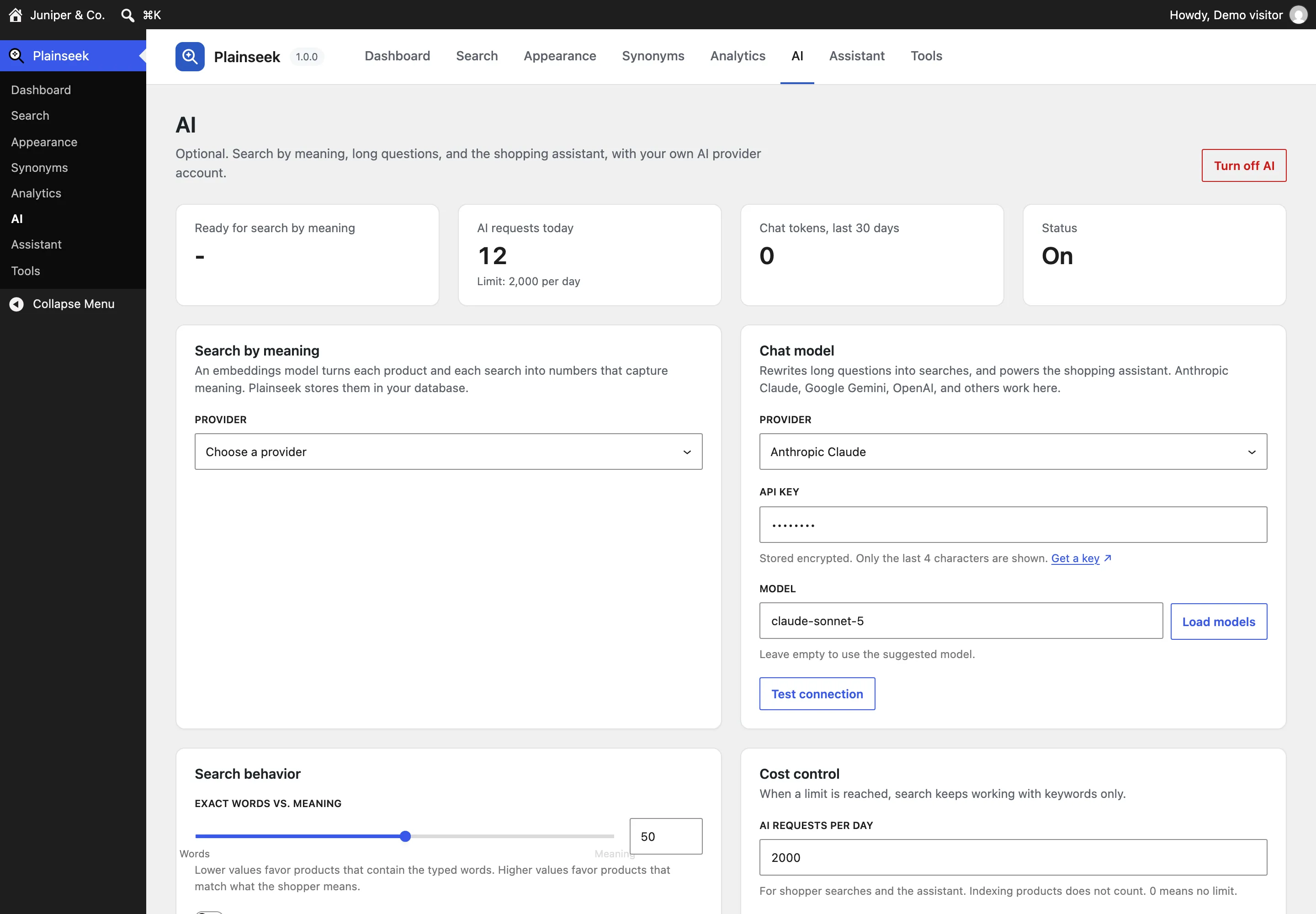
The live demo has no API key, so its assistant uses a short script in place of the AI model. Search by meaning is off there.
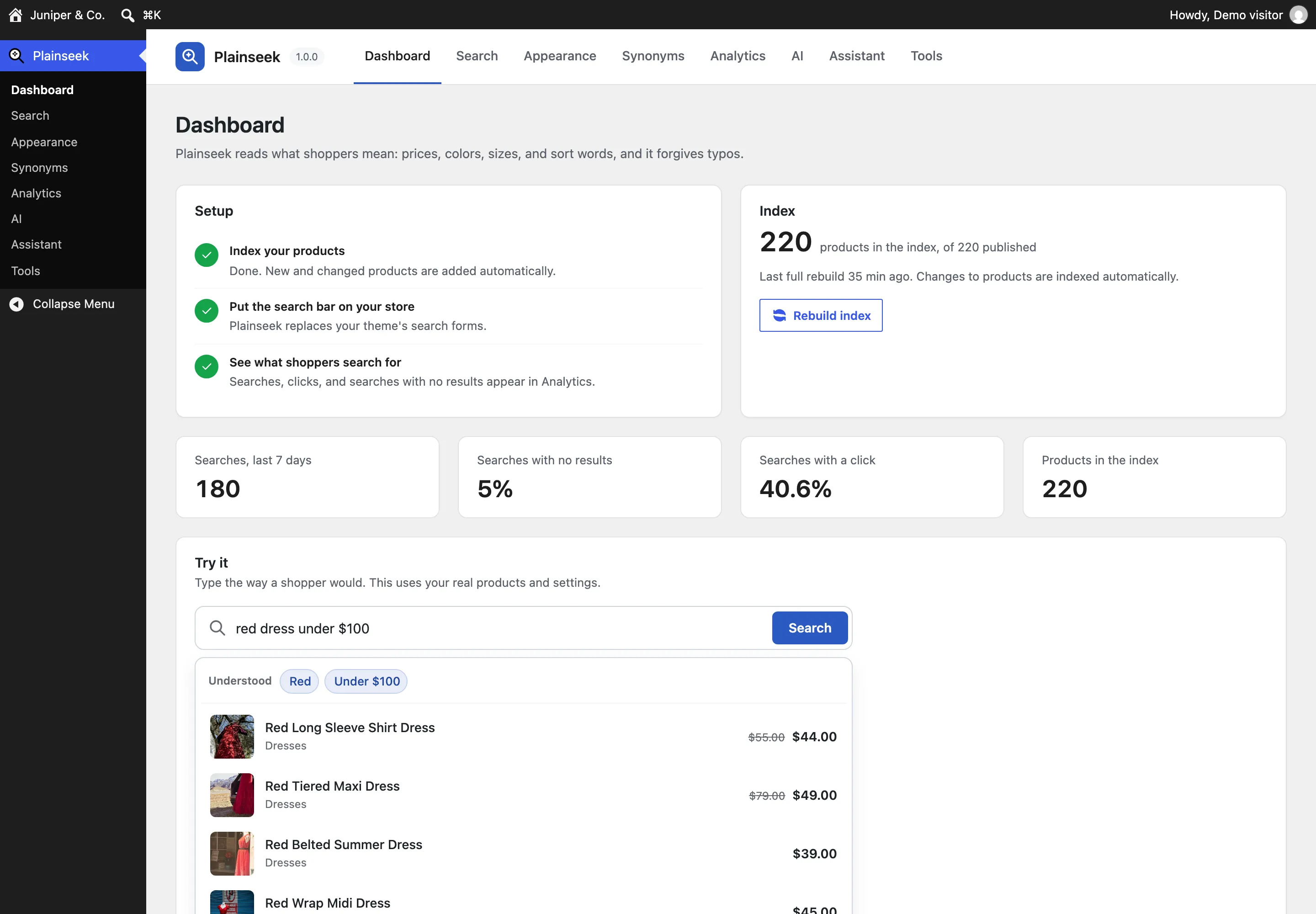
Plainseek has its own screens in the WordPress admin, made with the standard WordPress components. Every setting says what it does. The defaults work, so most stores change nothing.
Setup steps, the index, this week’s numbers, and a search box to try your own store.
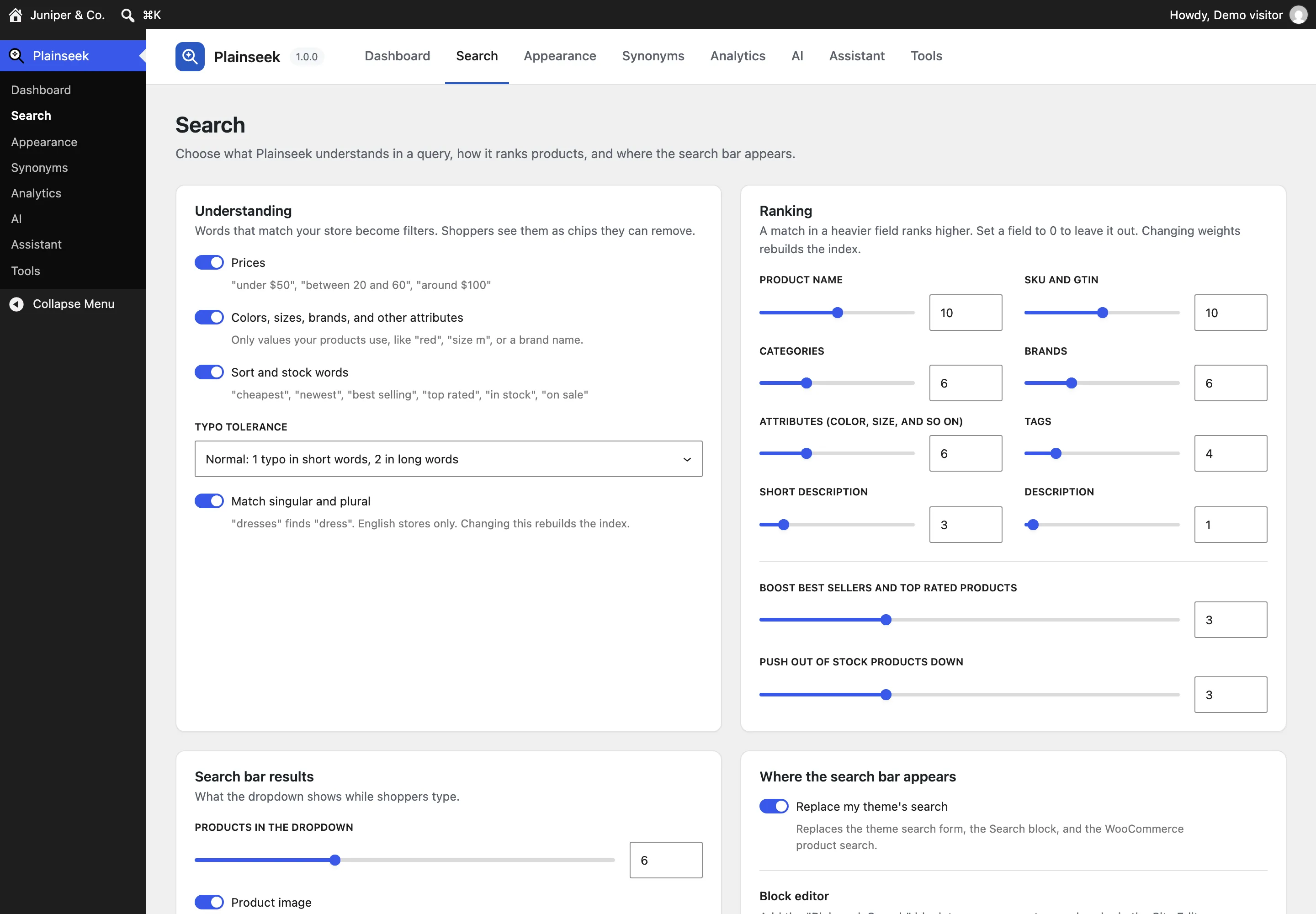
What Plainseek understands, how much typo tolerance to allow, how products rank, and where the search bar appears.
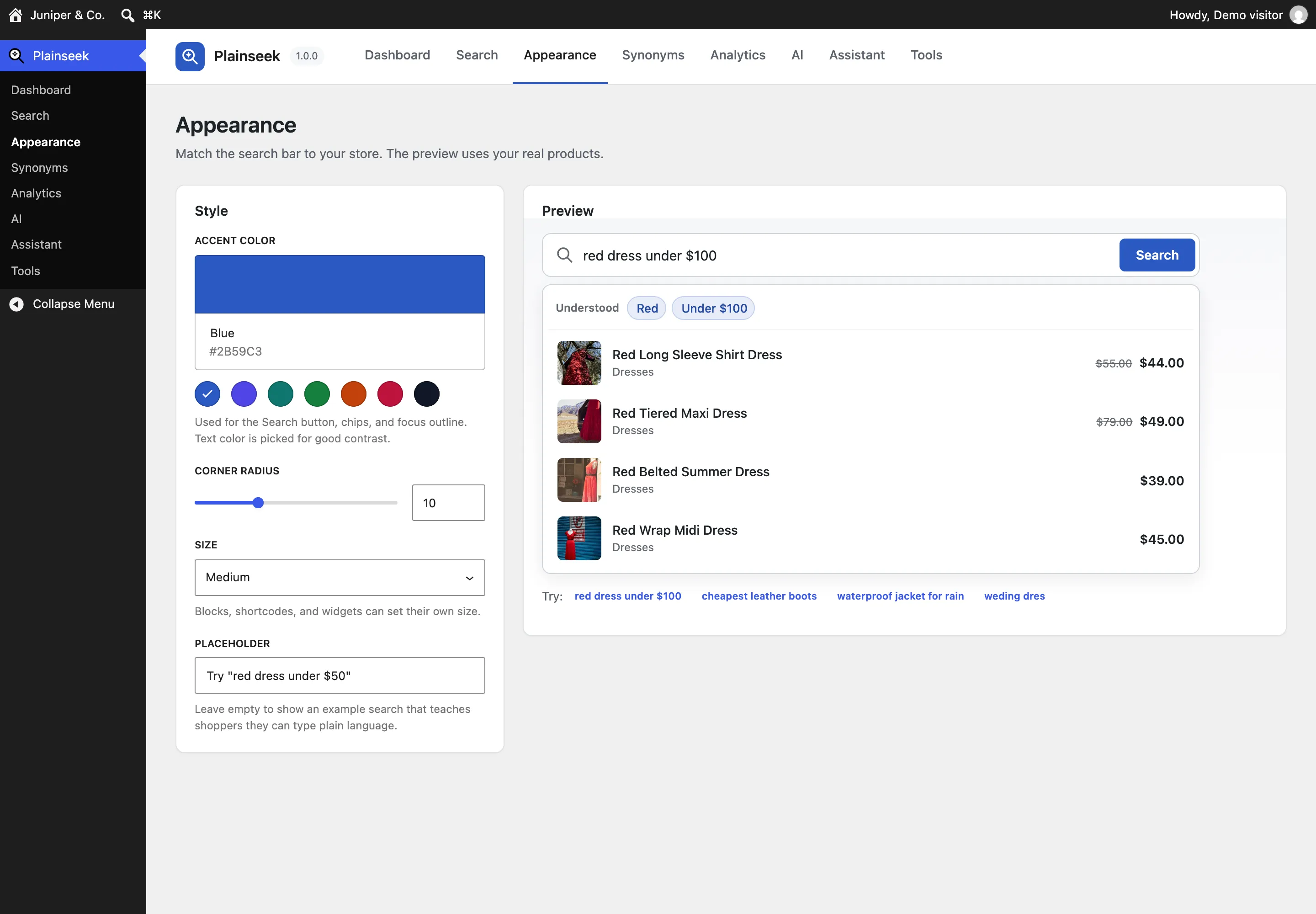
An accent color, the corner radius, the size, and the placeholder, with a live preview on your own products.
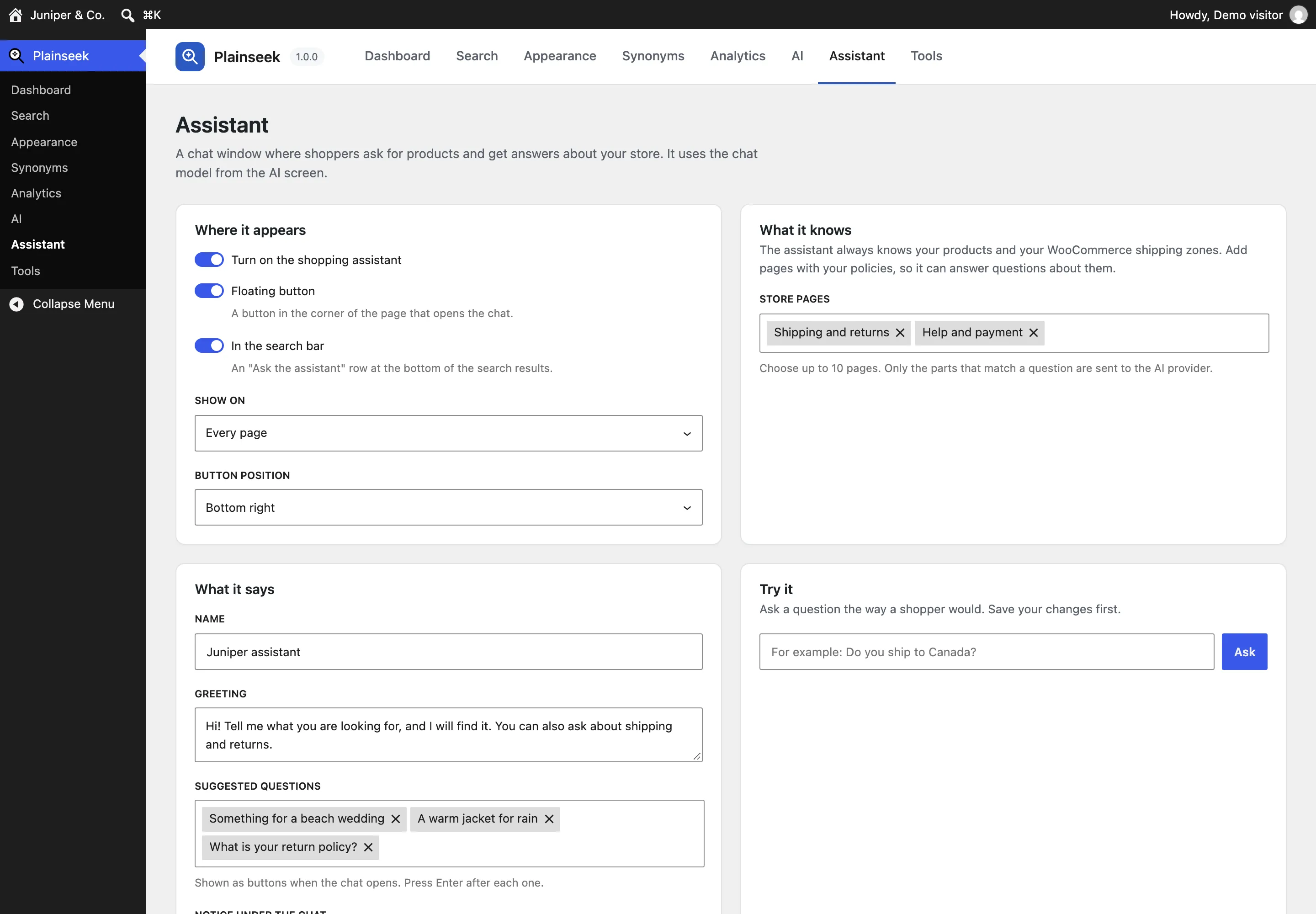
Where the assistant appears, which store pages it reads, its name, greeting, and suggested questions.
Install it, and your store’s search uses Plainseek. It works with block themes and classic themes.
Plainseek takes over the theme’s search form, the Search block, and the WooCommerce product search. Activate it, and you are done.
The Plainseek Search block, for the block editor and the Site Editor.
[plainseek] anywhere, with options for the size, the placeholder, and the button.
The Plainseek Search widget, for pages built with Elementor.
Pick the accent color, the corner radius, and the size. The text color on the accent is picked for good contrast.
The index and the search log live in three database tables. Tested with 20,000 products.
Action Scheduler indexes 50 products at a time. When you edit a product, the index updates on its own.
Prices and stock come from WooCommerce at the moment of the search.
Each shopper searches the products in their own language. Plainseek is ready for translation.
Works with HPOS order storage and with the Cart and Checkout blocks.
Deleting the plugin keeps your data, unless you choose to remove it in Plainseek > Tools.
| WordPress | 6.8 or newer | Tested with 7.1 |
|---|---|---|
| WooCommerce | 10.0 or newer | Tested with 11.1 |
| PHP | 8.1 or newer | - |
| Elementor | Optional | Tested with 4.3 |
| AI features | Optional | An API key from a supported provider |
Installation, every setting, the AI providers, privacy, and hooks for developers. It is the same guide that comes in the download.
Open the documentationNo. The search, the filters from the query, typo tolerance, synonyms, and analytics all work without AI. AI features are optional, and they are off until you turn them on.
No. The demo has no API key, so the shopping assistant’s replies come from a short script. Plainseek’s own work is real there: it finds the products, reads the store pages, and shows the product cards. With your own key, an AI model writes each answer. Search by meaning is off in the demo.
You pay your AI provider directly, for what you use. Plainseek keeps the cost low. It caches AI search results, sends a product again only when its text changes, and stops AI calls when your daily limit is reached. Search then keeps working with keywords. With Ollama, you can run the model on your own server.
Not unless you turn on AI features. Then product text and shopper searches go to the AI provider you choose. The AI screen lists exactly what is sent, and when.
Yes. Plainseek keeps its own search index in three database tables, and indexes products in the background with Action Scheduler. It was tested with 20,000 products.
It works with block themes and classic themes. The search results page uses your theme’s normal shop templates. You can also place the search bar with a block, a shortcode, or an Elementor widget.
Yes, with one limit. Your colors, sizes, brands, and other values work in any language, because Plainseek reads them from your products. Price and sort words, like “under” and “cheapest”, are read in English. Matching singular and plural is for English stores. With WPML or Polylang, each shopper searches in their own language.
It is kept, unless you turn on “Delete all Plainseek data when I delete the plugin” in Plainseek > Tools. Deactivating the plugin never deletes data.
Type a price, a color, or a typo, and see what Plainseek does with it.